<?xml version="1.0" encoding="utf-8"?><feed xmlns="http://www.w3.org/2005/Atom" ><generator uri="https://jekyllrb.com/" version="4.3.4">Jekyll</generator><link href="https://jbb.ghsq.de/feed.xml" rel="self" type="application/atom+xml" /><link href="https://jbb.ghsq.de/" rel="alternate" type="text/html" /><updated>2026-04-17T16:40:13+02:00</updated><id>https://jbb.ghsq.de/feed.xml</id><title type="html">Jonah Brüchert</title><subtitle>JBB&apos;s blog</subtitle><entry><title type="html">Generating GTFS Feeds</title><link href="https://jbb.ghsq.de/kde/2026/02/07/Generating-GTFS-Feeds.html" rel="alternate" type="text/html" title="Generating GTFS Feeds" /><published>2026-02-07T23:47:14+01:00</published><updated>2026-02-07T23:47:14+01:00</updated><id>https://jbb.ghsq.de/kde/2026/02/07/Generating-GTFS-Feeds</id><content type="html" xml:base="https://jbb.ghsq.de/kde/2026/02/07/Generating-GTFS-Feeds.html"><![CDATA[<p>Transitous is a project that runs a public transport routing service that aspires to work wold-wide.
The biggest leaps forward in coverage happened in the beginning, when it was just a matter of finding the right urls to download the schedules from. Most operators provide them in the GTFS format, which is also used in Google Transit and a few other apps.</p>

<p>However, the number of readily available GTFS schedules (so called feeds) that we are not using yet is starting to become quite small.
As evident when comparing with Google Transit, there are still a number of feeds that are only privately shared with Google. This is not great from a standpoint of preventing monopolies and also a major problem for free and open-source projects which don’t have the resources to discuss with each operator individually or to even buy access to the data from them.
Beyond that case, there is still a suprisingly large number of places in the world that do not publish any schedules in a standardized format, and that is something that we can fix.</p>

<p>Source data comes in many shapes and forms, but the ingredients we’ll definitely need are:</p>
<ul>
  <li>the lines</li>
  <li>stop times</li>
  <li>stop locations</li>
  <li>and service dates</li>
</ul>

<p>Sometimes you can find a provider specific API that returns the needed information, or there is open data in a non-standard format.
In the worst case, it might be necessary to scrape data out of the HTML of the website.</p>

<p>Some examples:</p>

<p>a stop time from the API of ŽPCG (Railway in Montenegro):</p>

<p><strong>Example 1</strong>:</p>
<div class="language-json highlighter-rouge"><div class="highlight"><pre class="highlight"><code><span class="p">{</span><span class="w">
    </span><span class="nl">"ArrivalTime"</span><span class="w"> </span><span class="p">:</span><span class="w"> </span><span class="s2">"15:49:16"</span><span class="p">,</span><span class="w">
    </span><span class="nl">"DepartureTime"</span><span class="w"> </span><span class="p">:</span><span class="w"> </span><span class="s2">"15:51:16"</span><span class="p">,</span><span class="w">
    </span><span class="nl">"stop"</span><span class="w"> </span><span class="p">:</span><span class="w"> </span><span class="p">{</span><span class="w">
        </span><span class="nl">"Latitude"</span><span class="w"> </span><span class="p">:</span><span class="w"> </span><span class="mf">42.511829</span><span class="p">,</span><span class="w">
        </span><span class="nl">"Longitude"</span><span class="w"> </span><span class="p">:</span><span class="w"> </span><span class="mf">19.203468</span><span class="p">,</span><span class="w">
        </span><span class="nl">"Name_en"</span><span class="w"> </span><span class="p">:</span><span class="w"> </span><span class="s2">"Spuž"</span><span class="p">,</span><span class="w">
        </span><span class="nl">"external_country_id"</span><span class="w"> </span><span class="p">:</span><span class="w"> </span><span class="mi">62</span><span class="p">,</span><span class="w">
        </span><span class="nl">"external_stop_id"</span><span class="w"> </span><span class="p">:</span><span class="w"> </span><span class="mi">31111</span><span class="p">,</span><span class="w">
        </span><span class="nl">"local"</span><span class="w"> </span><span class="p">:</span><span class="w"> </span><span class="mi">1</span><span class="p">,</span><span class="w">
    </span><span class="p">}</span><span class="w">
</span><span class="p">}</span><span class="w">
</span></code></pre></div></div>

<p>It is immediately visible that we get the stop times, in for some reason extreme precision.
We also get coordinates for the location, which makes conversion to GTFS much easier. Unfortunately the coordinates from this dataset are not exactly great, and can easily be off by multiple kilometers, but they nevertheless provide a rough estimate that we can improve on by matching them to OpenStreetMap.</p>

<p>The railway-data enthusiasts will also notice that we get a UIC country code and a stop code, which we can concatinate to get a full UIC stop identifier. We can make use of that for OSM matching later on.</p>

<p><strong>Example 2</strong>:</p>
<div class="language-xml highlighter-rouge"><div class="highlight"><pre class="highlight"><code><span class="nt">&lt;ElementTrasa</span> <span class="na">Ajustari=</span><span class="s">"0"</span> <span class="na">CodStaDest=</span><span class="s">"27888"</span> <span class="na">CodStaOrigine=</span><span class="s">"23428"</span> <span class="na">DenStaDestinatie=</span><span class="s">"Ram. Budieni"</span>
    <span class="na">DenStaOrigine=</span><span class="s">"Târgu Jiu"</span> <span class="na">Km=</span><span class="s">"1207"</span> <span class="na">Lungime=</span><span class="s">"250"</span> <span class="na">OraP=</span><span class="s">"45180"</span> <span class="na">OraS=</span><span class="s">"45300"</span> <span class="na">Rci=</span><span class="s">"R"</span> <span class="na">Rco=</span><span class="s">"R"</span> <span class="na">Restrictie=</span><span class="s">"0"</span>
    <span class="na">Secventa=</span><span class="s">"1"</span> <span class="na">StationareSecunde=</span><span class="s">"0"</span> <span class="na">TipOprire=</span><span class="s">"N"</span> <span class="na">Tonaj=</span><span class="s">"500"</span> <span class="na">VitezaLivret=</span><span class="s">"80"</span><span class="nt">/&gt;</span>
</code></pre></div></div>

<p>This example is from open data for railways in Romania. Unfortunately this one does not give us coordinates, and the fact that the fields are in abbreviated Romanian doesn’t make it too easy to understand for someone like me who does not speak any vaguely related language. However looking at the numbers, we can figure out that <code class="language-plaintext highlighter-rouge">OraP</code> and <code class="language-plaintext highlighter-rouge">OraS</code> are seconds and provide the departure and arrival times. However here, the data does not model the times at stops, but the transitions between the stops, so some more reshuffling is necessary.</p>

<p><strong>Example 3</strong>:</p>
<div class="language-json highlighter-rouge"><div class="highlight"><pre class="highlight"><code><span class="p">{</span><span class="w">
    </span><span class="nl">"ArrivalTimes"</span><span class="w"> </span><span class="p">:</span><span class="w"> </span><span class="s2">"12:35, 13:37, 14:02, 14:21, 14:52, 14:27, 15:04, 15:50, 16:14, 16:39, 17:08, 17:36, 18:55, 19:03, 19:12, 20:05, 20:33, 21:12, 21:47"</span><span class="p">,</span><span class="w">
    </span><span class="nl">"Classes"</span><span class="w"> </span><span class="p">:</span><span class="w"> </span><span class="s2">"2"</span><span class="p">,</span><span class="w">
    </span><span class="nl">"DepartureTimes"</span><span class="w"> </span><span class="p">:</span><span class="w"> </span><span class="s2">"12:35, 13:38, 14:03, 14:22, 15:12, 14:42, 15:29, 15:51, 16:15, 16:40, 17:33, 17:37, 18:57, 19:08, 19:13, 20:06, 20:34, 21:13, 21:47"</span><span class="p">,</span><span class="w">
    </span><span class="nl">"Route"</span><span class="w"> </span><span class="p">:</span><span class="w"> </span><span class="s2">"Vilnius-Krokuva"</span><span class="p">,</span><span class="w">
    </span><span class="nl">"RouteStops"</span><span class="w"> </span><span class="p">:</span><span class="w"> </span><span class="s2">"Vilnius, Kaunas, Kazlų Rūda, Marijampolė, Mockava, Trakiškė/Trakiszki, Suvalkai/Suwałki, Augustavas/Augustów, Dambrava/Dąbrowa Białostocka, Sokulka/Sokółka, Balstogė/Białystok, Balstogė (Žaliakalnio stotis) / Białystok Zielone Wzgórza, Varšuva (Rytinė stotis)/ Warszawa Wschodnia, Varšuva (Centrinė stotis)/ Warszawa Centralna, Varšuva (Vakarinė stotis)/ Warszawa Zachodnia, Opočnas (Pietinė stotis)/Opoczno Południe, Vloščova (Šiaurinė stotis)/Włoszczowa Północ, Mechuvas/Miechów, Krokuva (Pagrindinė stotis)/ Kraków Główny"</span><span class="p">,</span><span class="w">
    </span><span class="nl">"RunWeekdays"</span><span class="w"> </span><span class="p">:</span><span class="w"> </span><span class="s2">"1,2,3,4,5,6,7"</span><span class="p">,</span><span class="w">
    </span><span class="nl">"Spaces"</span><span class="w"> </span><span class="p">:</span><span class="w"> </span><span class="s2">"WHEELCHAIR, BICYCLE"</span><span class="p">,</span><span class="w">
    </span><span class="nl">"TrainNumber"</span><span class="w"> </span><span class="p">:</span><span class="w"> </span><span class="s2">"33/141"</span><span class="w">
</span><span class="p">}</span><span class="w">
</span></code></pre></div></div>

<p>This example is from the, to my knowledge, only source of semi-machine-readable information on railway timetables in Lithuania.
While json is straightforward to parse, this one for some reason does not use json arrays, but comma-separated lists. We can still work with this of course, until a stop appears whose name contains a comma. Oh well. Once again, no coordinates are provided. While it is tempting to think this should be easier to convert than xml in Romanian, this format has some more hidden fun.
If you have been to the area the line from the example operates in, you might already have noticed that the time zone changes between Lithuania and Poland. Unfortunately, there is no notice of that in the data, just a randomly backwards-jumping arrival and departure time.</p>

<p>To work with this, we first need to match the stop names to coordinates, then figure out the time zones from that, and then convert the stop times.</p>

<h2 id="matching-stations-to-locations">Matching stations to locations</h2>

<p>OpenStreetMap is the obvious choice for this. It is fairly easy to query the station locations, but matching the strings to the node in OSM is not trivial.
There are often variations in spelling, particularly if the data covers neighbouring countries with different languages. The data may also have latinized names, while the country usually uses a different script and so on.</p>

<p>Since this problem comes up repeatedly, I am slowly improving my rust library (<code class="language-plaintext highlighter-rouge">gtfs-generator</code>) for this, so it can hopefully handle most of these cases automatically at some point.
It aims to be very customizable, so the matching criteria needs to be supplied by the library user.
The following example matches a stop if it has a matching uic_ref tag, which is a strong identifier.
If no node has such a matching tag, all nodes in the radius of 20km are considered if their name is either a direct match, an abbreviation of the other spelling, similar enough or has matching words.
The matching radius can be overridden in each query, so if nothing is known yet, the first guess can be the middle of the country with a large enough radius.
As soon as one station is known, the ones appearing on the same route must be fairly close.
The matching quality strongly depends on making a good guess of the distance from the previous stop, as it greatly reduces the risk of similarly named stations being mismatched.</p>

<p>Since OpenStreetMap provides different multi-lingual name tags, the order that these should be considered in needs to be set as well.</p>

<p>The code for matching will look something like this:</p>
<div class="language-rust highlighter-rouge"><div class="highlight"><pre class="highlight"><code><span class="k">let</span> <span class="k">mut</span> <span class="n">matcher</span> <span class="o">=</span> <span class="nn">osm</span><span class="p">::</span><span class="nn">StationMatcherBuilder</span><span class="p">::</span><span class="nf">new</span><span class="p">()</span>
    <span class="nf">.match_on</span><span class="p">(</span><span class="nn">osm</span><span class="p">::</span><span class="nn">MatchRule</span><span class="p">::</span><span class="nf">FirstMatch</span><span class="p">(</span><span class="nd">vec!</span><span class="p">[</span>
        <span class="nn">osm</span><span class="p">::</span><span class="nn">MatchRule</span><span class="p">::</span><span class="n">CustomTag</span> <span class="p">{</span>
            <span class="n">name</span><span class="p">:</span> <span class="s">"uic_ref"</span><span class="nf">.to_string</span><span class="p">(),</span>
        <span class="p">},</span>
        <span class="nn">osm</span><span class="p">::</span><span class="nn">MatchRule</span><span class="p">::</span><span class="nf">Both</span><span class="p">(</span>
            <span class="nn">Box</span><span class="p">::</span><span class="nf">from</span><span class="p">(</span><span class="nn">osm</span><span class="p">::</span><span class="nn">MatchRule</span><span class="p">::</span><span class="n">Position</span> <span class="p">{</span>
                <span class="n">max_distance_m_default</span><span class="p">:</span> <span class="mi">20000</span><span class="p">,</span>
            <span class="p">}),</span>
            <span class="nn">Box</span><span class="p">::</span><span class="nf">from</span><span class="p">(</span><span class="nn">osm</span><span class="p">::</span><span class="nn">MatchRule</span><span class="p">::</span><span class="nf">FirstMatch</span><span class="p">(</span><span class="nd">vec!</span><span class="p">[</span>
                <span class="nn">osm</span><span class="p">::</span><span class="nn">MatchRule</span><span class="p">::</span><span class="n">Name</span><span class="p">,</span>
                <span class="nn">osm</span><span class="p">::</span><span class="nn">MatchRule</span><span class="p">::</span><span class="n">NameAbbreviation</span><span class="p">,</span>
                <span class="nn">osm</span><span class="p">::</span><span class="nn">MatchRule</span><span class="p">::</span><span class="n">NameSimilar</span> <span class="p">{</span>
                    <span class="n">min_similarity</span><span class="p">:</span> <span class="mf">0.8</span><span class="p">,</span>
                <span class="p">},</span>
                <span class="nn">osm</span><span class="p">::</span><span class="nn">MatchRule</span><span class="p">::</span><span class="n">NameSubstring</span><span class="p">,</span>
            <span class="p">])),</span>
        <span class="p">),</span>
    <span class="p">]))</span>
    <span class="nf">.name_tag_precedence</span><span class="p">(</span>
        <span class="p">[</span>
            <span class="s">"name"</span><span class="p">,</span>
            <span class="s">"name:ro"</span><span class="p">,</span>
            <span class="s">"short_name"</span><span class="p">,</span>
            <span class="s">"name:en"</span><span class="p">,</span>
            <span class="s">"alt_name"</span><span class="p">,</span>
            <span class="s">"alt_name:ro"</span><span class="p">,</span>
            <span class="s">"int_name"</span><span class="p">,</span>
        <span class="p">]</span>
        <span class="nf">.into_iter</span><span class="p">()</span>
        <span class="nf">.map</span><span class="p">(</span><span class="nn">ToString</span><span class="p">::</span><span class="n">to_string</span><span class="p">)</span>
        <span class="nf">.collect</span><span class="p">(),</span>
    <span class="p">)</span>
    <span class="nf">.transliteration_lang</span><span class="p">(</span><span class="nn">TransliterationLanguage</span><span class="p">::</span><span class="n">Bg</span><span class="p">)</span>
    <span class="nf">.download_stations</span><span class="p">(</span><span class="o">&amp;</span><span class="p">[</span><span class="s">"RO"</span><span class="p">,</span> <span class="s">"HU"</span><span class="p">,</span> <span class="s">"BG"</span><span class="p">,</span> <span class="s">"MD"</span><span class="p">])</span>
    <span class="nf">.unwrap</span><span class="p">();</span>
    
    <span class="c1">// Parse input</span>

    <span class="k">let</span> <span class="n">station</span> <span class="o">=</span> <span class="n">matcher</span><span class="nf">.find_matching_station</span><span class="p">(</span><span class="o">&amp;</span><span class="nn">osm</span><span class="p">::</span><span class="n">StationFacts</span> <span class="p">{</span>
        <span class="n">name</span><span class="p">:</span> <span class="nf">Some</span><span class="p">(</span><span class="n">name</span><span class="p">),</span>
        <span class="n">pos</span><span class="p">:</span> <span class="nf">Some</span><span class="p">(</span><span class="n">previous_coordinates</span><span class="nf">.unwrap_or</span><span class="p">((</span><span class="mf">46.13</span><span class="p">,</span> <span class="mf">24.81</span><span class="p">))),</span> <span class="c1">// If we know nothing yet, bias to the middle of Romania, so we at least don't end up in the wrong country</span>
        <span class="n">max_distance_m</span><span class="p">:</span> <span class="k">match</span> <span class="p">(</span><span class="n">previous_coordinates</span><span class="p">,</span> <span class="n">previous_time</span><span class="p">,</span> <span class="n">atime</span><span class="p">)</span> <span class="p">{</span>
            <span class="c1">// We have previous coordinates, but nothing for this station. Base limit on max reachable distance at reasonable speed</span>
            <span class="p">(</span><span class="nf">Some</span><span class="p">(</span><span class="n">_prev_coords</span><span class="p">),</span> <span class="nf">Some</span><span class="p">(</span><span class="n">departure</span><span class="p">),</span> <span class="nf">Some</span><span class="p">(</span><span class="n">arrival</span><span class="p">))</span> <span class="k">=&gt;</span> <span class="p">{</span>
                <span class="k">let</span> <span class="n">travel_seconds</span> <span class="o">=</span> <span class="n">arrival</span> <span class="o">-</span> <span class="n">departure</span><span class="p">;</span>
                <span class="nf">Some</span><span class="p">(</span><span class="n">travel_seconds</span> <span class="o">*</span> <span class="mi">70</span><span class="p">)</span> <span class="c1">// m/s</span>
            <span class="p">}</span>
            <span class="c1">// No previous location known</span>
            <span class="n">_</span> <span class="k">=&gt;</span> <span class="nf">Some</span><span class="p">(</span><span class="mi">800000</span><span class="p">),</span>
        <span class="p">},</span>
        <span class="n">values</span><span class="p">:</span> <span class="nn">HashMap</span><span class="p">::</span><span class="nf">from_iter</span><span class="p">([(</span><span class="s">"uic_ref"</span><span class="nf">.to_string</span><span class="p">(),</span> <span class="n">uic_ref</span><span class="nf">.clone</span><span class="p">())]),</span>
    <span class="p">});</span>
</code></pre></div></div>

<p>For now, until I’m somewhat certain about the API, you’ll need to use the <a href="https://codeberg.org/jbb/gtfs-generator">git repository</a> directly to use the OSM matching feature.</p>

<h2 id="finally-writing-the-gtfs-file">Finally writing the GTFS file</h2>

<p>After all the ingredients are collected, the actual GTFS conversion should be fairly easy.
We now need to sort the data we collected into the main categories of objects represented by GTFS, routes, trips, stops, and stop_times.</p>

<p>Every trip needs to have a corresponding route. The exact distinction between different routes depends on the specific transit system.
In the simplest case, if multiple buses operate with the same line number on the same day, they would belong to the same route.
Each time the bus operates per day, a new GTFS trip starts.</p>

<p>If the system does not have the concept of routes, every trip simply is its own route. This is for example what Deutsche Bahn does for ICE trains, where each journey has it’s own train number.</p>

<p>The code for building the GTFS data looks somewhat like this:</p>

<div class="language-rust highlighter-rouge"><div class="highlight"><pre class="highlight"><code>    <span class="k">let</span> <span class="k">mut</span> <span class="n">gtfs</span> <span class="o">=</span> <span class="nn">GtfsGenerator</span><span class="p">::</span><span class="nf">new</span><span class="p">();</span>

    <span class="c1">// parse input</span>

    <span class="n">gtfs</span><span class="nf">.add_stop</span><span class="p">(</span><span class="nn">gtfs_structures</span><span class="p">::</span><span class="n">Stop</span> <span class="p">{</span>
        <span class="n">id</span><span class="p">:</span> <span class="n">stop_time</span><span class="py">.station_code</span><span class="nf">.to_string</span><span class="p">(),</span>
        <span class="n">name</span><span class="p">:</span> <span class="nf">Some</span><span class="p">(</span><span class="n">stop_time</span><span class="py">.station_name</span><span class="nf">.to_string</span><span class="p">()),</span>
        <span class="n">latitude</span><span class="p">:</span> <span class="n">coordinates</span><span class="nf">.as_ref</span><span class="p">()</span><span class="nf">.map</span><span class="p">(|(</span><span class="n">lat</span><span class="p">,</span> <span class="n">_</span><span class="p">)|</span> <span class="o">*</span><span class="n">lat</span><span class="p">),</span>
        <span class="n">longitude</span><span class="p">:</span> <span class="n">coordinates</span><span class="nf">.as_ref</span><span class="p">()</span><span class="nf">.map</span><span class="p">(|(</span><span class="n">_</span><span class="p">,</span> <span class="n">lon</span><span class="p">)|</span> <span class="o">*</span><span class="n">lon</span><span class="p">),</span>
        <span class="o">..</span><span class="nn">Default</span><span class="p">::</span><span class="nf">default</span><span class="p">()</span>
    <span class="p">})</span>
    <span class="nf">.unwrap</span><span class="p">();</span>

    <span class="n">gtfs</span><span class="nf">.add_stop_time</span><span class="p">(</span><span class="nn">gtfs_structures</span><span class="p">::</span><span class="n">RawStopTime</span> <span class="p">{</span>
        <span class="n">trip_id</span><span class="p">:</span> <span class="n">trip_id</span><span class="nf">.clone</span><span class="p">(),</span>
        <span class="n">arrival_time</span><span class="p">:</span> <span class="nf">Some</span><span class="p">(</span><span class="n">atime</span><span class="nf">.unwrap_or</span><span class="p">(</span><span class="n">dtime</span><span class="p">)),</span>
        <span class="n">departure_time</span><span class="p">:</span> <span class="nf">Some</span><span class="p">(</span><span class="n">dtime</span><span class="p">),</span>
        <span class="n">stop_id</span><span class="p">:</span> <span class="n">stop_time</span><span class="py">.station_code</span><span class="nf">.to_string</span><span class="p">(),</span>
        <span class="n">stop_sequence</span><span class="p">:</span> <span class="n">stop_time</span><span class="py">.sequence</span><span class="p">,</span>
        <span class="o">..</span><span class="nn">Default</span><span class="p">::</span><span class="nf">default</span><span class="p">()</span>
    <span class="p">})</span>
    <span class="nf">.unwrap</span><span class="p">();</span>
    
    <span class="n">gtfs</span><span class="nf">.write_to</span><span class="p">(</span><span class="s">"out.gtfs.zip"</span><span class="p">)</span><span class="nf">.unwrap</span><span class="p">();</span>
</code></pre></div></div>

<h2 id="validating-the-result">Validating the result</h2>

<p>A new GTFS feed is rarely perfect on the first try. I recommend running it through <a href="https://github.com/public-transport/gtfsclean">gtfsclean</a> first.
After all obvious issues are fixed (missing fields, broken references), you can use the <a href="https://transport.data.gouv.fr/validation?type=gtfs&amp;selected_subtile=gtfs&amp;selected_tile=public-transit">validator of the French government</a> and the <a href="https://gtfs-validator.mobilitydata.org/">canonical GTFS validator</a>.
It is worth using both, as they check for slightly different issues.</p>

<p>Once all critical errors reported by the validators are fixed, you can finally test the result in MOTIS. You can get a precompiled static binary from <a href="https://github.com/motis-project/motis/">GitHub Releases</a>.
Afterwards create a minimal config file using <code class="language-plaintext highlighter-rouge">./motis config out.gtfs.zip</code>.
The API on it’s own is not too useful for testing, so add</p>

<div class="language-yaml highlighter-rouge"><div class="highlight"><pre class="highlight"><code><span class="na">server</span><span class="pi">:</span>
  <span class="na">web_folder</span><span class="pi">:</span> <span class="s">/path/to/ui/directory</span>
</code></pre></div></div>

<p>to the top of the file to make the web interface available.</p>

<p>Make sure to also enable the <code class="language-plaintext highlighter-rouge">geocoding</code> option, so you can search for stops.</p>

<p>Now all that’s needed is loading the data and starting the server:</p>
<div class="language-bash highlighter-rouge"><div class="highlight"><pre class="highlight"><code>./motis import
./motis server
</code></pre></div></div>

<p>You should now be able to search for your stops and find routes:</p>

<p><a href="/img/gtfs/motis.png">
    <img src="/img/gtfs/motis.png" width="800px" height="" class="" alt="MOTIS showing a connection between Vilnius and Riga" />
</a></p>

<h2 id="publishing">Publishing</h2>

<p>Once it is ready, the GTFS feed needs to be uploaded to a location that provides a stable url even if the feed is updated. The webserver should also support the <code class="language-plaintext highlighter-rouge">Last-Modified</code>-header, so the feed can be downloaded only when needed. A simple webserver serving a directory like nginx or apache works well here, but something like Nextcloud works equally well if you already have access to an instance of it.</p>

<p>Since the converted dataset needs to be regularly updated, I recommend setting up a CI pipeline for that purpose. The free CI offered by gitlab.com and GitHub is usually good enough for that.
I recommend setting up <a href="https://github.com/ad-freiburg/pfaedle">pfaedle</a> in the pipeline, to automatically add the exact path the vehicles take based on routing on OpenStreetMap data.</p>

<p>Once you have a URL, you can <a href="https://transitous.org/doc/#static-feeds-timetable">add it to Transitous</a> and places where other developers can find it, like the <a href="https://gtfs-validator.mobilitydata.org/">Mobility Database</a></p>

<p>If you are interested in some examples of datasets generated this way, check out the Mobility Database entries for <a href="https://mobilitydatabase.org/feeds/gtfs/mdb-2991">LTG Link</a> and <a href="https://mobilitydatabase.org/feeds/gtfs/mdb-2377">ŽPCG</a>.
You can find a list with some examples of feeds I generate <a href="https://jbb.ghsq.de/gtfs-feeds/">here</a>, including the generator source code based on the <code class="language-plaintext highlighter-rouge">gtfs-generator</code> crate.</p>

<p>You can always ask in the <a href="https://riot.spline.de/#/room/#transitous:matrix.spline.de">Transitous Matrix channel</a> in case you hit any roadblocks with your own GTFS-converter projects.</p>]]></content><author><name></name></author><category term="kde" /><summary type="html"><![CDATA[Transitous is a project that runs a public transport routing service that aspires to work wold-wide. The biggest leaps forward in coverage happened in the beginning, when it was just a matter of finding the right urls to download the schedules from. Most operators provide them in the GTFS format, which is also used in Google Transit and a few other apps.]]></summary></entry><entry><title type="html">39C3</title><link href="https://jbb.ghsq.de/kde/2026/01/01/39C3.html" rel="alternate" type="text/html" title="39C3" /><published>2026-01-01T22:12:02+01:00</published><updated>2026-01-01T22:12:02+01:00</updated><id>https://jbb.ghsq.de/kde/2026/01/01/39C3</id><content type="html" xml:base="https://jbb.ghsq.de/kde/2026/01/01/39C3.html"><![CDATA[<p>Volker mentioned that we need better blog post coverage of events, so hereby I’m doing my part :)</p>

<p>I attended the yearly 39th Chaos Communication Congress (39C3), together with a number of KDE people and my local hackerspace <a href="https://spline.de">Spline</a>.</p>

<p>This year I wanted to attend a few more talks live and in person, which worked somewhat well.
I’ll include a list of talks in the end, in case you are looking for some ideas for talks to watch on media.ccc.de.</p>

<p>Just like last year, I spend a large amount of time at the KDE assembly. Once again, we were part of the Bits &amp; Bäume Habitat.
My initial worries about our new location being being in a fairly dark hall instead of the bright and very visible area near the central stairs turned out to be unjustified.
We received tons of great feedback and had many nice and motivating conversations with other developers and users.</p>

<p>Victoria started a Konqi hotline service on the Congress phone network, which was in high demand.</p>

<p>The most important activity for me at Congress was meeting some Transitous contributors I had not yet talked to in person.
It was great to meet you all.</p>

<p>There were also multiple opportunities to connect with GNOME developers and designers. We identified some low-level components that we might be able to share. We exchanged our ideas for making contributing as easy as possible for new contributors, a topic which GNOME is doing fairly well at as far as I can tell.</p>

<h2 id="projects">Projects</h2>

<p><a href="/img/itinerary/maplibre.png">
    <img src="/img/itinerary/maplibre.png" width="300px" height="" class="post-img post-img-right" alt="Map in KDE Itinerary rendered using MapLibre" />
</a></p>

<p>Later on, the KDE assembly turned into a (very small) mini-KDE-Sprint.
We shipped <a href="https://invent.kde.org/pim/itinerary/-/merge_requests/454">much improved maps in KDE Itinerary</a>, based on the MapLibre project.
This allows us to render vector-based tiles, which means they can be displayed at any size without visible pixels. Zooming in and out should also be much smoother.
This should also fix the pixelated rendering at certain zoom level that sometimes showed with the previously used map.
Another advantage is, that the map now shows labels in the local language as well as English. This makes the map much more useful in case you cannot read a locally used script.
In the future, we might even be able to use map tiles that can display labels in your preferred language.
A big Thanks to Volker, Carl and Tobias who helped with bundling and testing MapLibre for Android.</p>

<p>Afterwards, we looked into options for making a more general KDE maps application, but this will take a bit more work.
However, we already have a number of great components, which should make this much easier, such as the code for accessing public transport data known from KDE Itinerary, KPublicTransport, the library for reading opening hours (KOpeningHours) and our library for accessing weather forecasts, KWeatherCore.
That leaves this as mostly a matter of tying together all of these components in a nice UI. However, the Qt bindings for MapLibre don’t currently expose enough details for us to do that, so some preparation is required.</p>

<p>I also managed to work on a few long-standing tasks in Transitous. It is now possible to add manual configuration options to public transport feeds in France, which used to be overwritten by a script.
Additionally, it is now possible to automatically add all feeds for a country from the Mobility Database, which should make adding new countries a lot easier.</p>

<h2 id="sessions">Sessions</h2>

<ul>
  <li><a href="https://events.ccc.de/congress/2025/hub/en/event/detail/treffen-der-bahn-chaosbubble">Railway-bubble Meetup</a>
Meetup of people interested in a diverse list of railway-adjacent topics.
I joined the subgroup interested in crowd-sourcing GPS positions of trains, where I presented the minimal prototype I built for Transitous.</li>
  <li><a href="https://events.ccc.de/congress/2025/hub/en/event/detail/transitous-meetup">Transitous Meetup</a>
We met with some users of the Transitous API and apps, and exchanged ideas for future improvements.
A major topic was support for accessibility features, like considering elevator status in routing.
We also discussed possible ways to improve the accuracy and details of data in Germany, where schedules go through a long pipeline that loses details and introduces long delays in the delivery of changes.
Thanks to Julius for organizing and moderating this.</li>
</ul>

<h2 id="talks">Talks</h2>

<ul>
  <li><a href="https://fahrplan.events.ccc.de/congress/2025/fahrplan/event/zps-ein-jahr-adenauer-srp-und-mehr">Zentrum für Politische Schönheit: Ein Jahr Adenauer SRP+ und der Walter Lübcke Memorial Park</a> - A quite fun and hopeful talk, considering the broader topics covered, about the work of a political art collective in Germany.</li>
  <li><a href="https://fahrplan.events.ccc.de/congress/2025/fahrplan/event/all-my-deutschlandtickets-gone-fraud-at-an-industrial-scale">All my Deutschlandtickets gone: Fraud at an industrial scale</a>
Investigation into different kinds of fraud patterns based on Deutschlandtickets.</li>
  <li><a href="https://fahrplan.events.ccc.de/congress/2025/fahrplan/event/human-microservices-at-the-dutch-railways-modern-architecture-ancient-hardware">Human microservices at the Dutch Railways: modern architecture, ancient hardware?</a> - Insights into the operations of Dutch Railways</li>
  <li><a href="https://fahrplan.events.ccc.de/congress/2025/fahrplan/event/infrastructure-review">Infrastructure Review</a> - Interesting statistics on the huge scale of infrastructure involved in the Congress</li>
</ul>

<p>As you can see, I still left a lot to watch online over the following few days.</p>]]></content><author><name></name></author><category term="kde" /><summary type="html"><![CDATA[Volker mentioned that we need better blog post coverage of events, so hereby I’m doing my part :)]]></summary></entry><entry><title type="html">Improving the experience with public Wi-Fi hotspots</title><link href="https://jbb.ghsq.de/kde/2025/08/29/freewifid.html" rel="alternate" type="text/html" title="Improving the experience with public Wi-Fi hotspots" /><published>2025-08-29T12:05:07+02:00</published><updated>2025-08-29T12:05:07+02:00</updated><id>https://jbb.ghsq.de/kde/2025/08/29/freewifid</id><content type="html" xml:base="https://jbb.ghsq.de/kde/2025/08/29/freewifid.html"><![CDATA[<p>When travelling, I tend to rely on public Wi-Fi hotspots a lot, for example on trains, while waiting at the station, in cafe’s and so on.</p>

<p>Accepting the same terms and conditions every time gets annoying pretty quickly, so a few years ago I decided to automate this. The project that came out of that is freewifid.</p>

<p>It continously scans for Wi-Fi networks it knows, and sends you a notification when it found one it can automatically connect to. You can then allow it to connect to that network automatically in the future.</p>

<p><img src="/img/freewifid/notification.png" alt="A freewifid notification asking whether to connect to a known network" /></p>

<h2 id="adding-support-for-new-captive-portals">Adding support for new captive portals</h2>

<p>Adding support for a new kind of captive portal is pretty easy. You just need to implement a small rust trait that includes a function that sends the specific request for the captive portal. Often this is very simple and looks like this:</p>

<div class="language-rust highlighter-rouge"><div class="highlight"><pre class="highlight"><code><span class="k">pub</span> <span class="k">struct</span> <span class="n">LtgLinkProvider</span> <span class="p">{}</span>

<span class="k">impl</span> <span class="n">LtgLinkProvider</span> <span class="p">{</span>
    <span class="k">pub</span> <span class="k">fn</span> <span class="nf">new</span><span class="p">()</span> <span class="k">-&gt;</span> <span class="n">LtgLinkProvider</span> <span class="p">{</span> <span class="n">LtgLinkProvider</span> <span class="p">{}</span> <span class="p">}</span>
<span class="p">}</span>

<span class="k">impl</span> <span class="n">CaptivePortal</span> <span class="k">for</span> <span class="n">LtgLinkProvider</span> <span class="p">{</span>
    <span class="k">fn</span> <span class="nf">can_handle</span><span class="p">(</span><span class="o">&amp;</span><span class="k">self</span><span class="p">,</span> <span class="n">ssid</span><span class="p">:</span> <span class="o">&amp;</span><span class="nb">str</span><span class="p">)</span> <span class="k">-&gt;</span> <span class="nb">bool</span> <span class="p">{</span>
        <span class="p">[</span><span class="s">"Link WIFI"</span><span class="p">]</span><span class="nf">.contains</span><span class="p">(</span><span class="o">&amp;</span><span class="n">ssid</span><span class="p">)</span>
    <span class="p">}</span>

    <span class="k">fn</span> <span class="nf">login</span><span class="p">(</span><span class="o">&amp;</span><span class="k">self</span><span class="p">,</span> <span class="n">http_client</span><span class="p">:</span> <span class="o">&amp;</span><span class="nn">ureq</span><span class="p">::</span><span class="n">Agent</span><span class="p">)</span> <span class="k">-&gt;</span> <span class="nn">anyhow</span><span class="p">::</span><span class="nb">Result</span><span class="o">&lt;</span><span class="p">()</span><span class="o">&gt;</span> <span class="p">{</span>
        <span class="c1">// Store any cookies the landing page might send</span>
        <span class="nn">common</span><span class="p">::</span><span class="nf">follow_automatic_redirect</span><span class="p">(</span><span class="n">http_client</span><span class="p">)</span><span class="o">?</span><span class="p">;</span>

        <span class="n">http_client</span>
            <span class="nf">.post</span><span class="p">(</span><span class="s">"http://192.168.1.100:8880/guest/s/default/login"</span><span class="p">)</span>
            <span class="nf">.send_form</span><span class="p">([</span>
                <span class="p">(</span><span class="s">"checkbox"</span><span class="p">,</span> <span class="s">"on"</span><span class="p">),</span>
                <span class="p">(</span><span class="s">"landing_url"</span><span class="p">,</span> <span class="k">crate</span><span class="p">::</span><span class="n">GENERIC_CHECK_URL</span><span class="p">),</span>
                <span class="p">(</span><span class="s">"accept"</span><span class="p">,</span> <span class="s">"PRISIJUNGTI"</span><span class="p">),</span>
            <span class="p">])</span><span class="o">?</span><span class="p">;</span>

        <span class="nf">Ok</span><span class="p">(())</span>
    <span class="p">}</span>
<span class="p">}</span>
</code></pre></div></div>

<p>For finding out what needs to be sent, you can use your favoute browser’s inspection tools.</p>

<p>For testing, Plasma’s feature for assigning a random MAC-address comes very handy.</p>

<h2 id="integration-with-plasma">Integration with Plasma</h2>

<p>It could be interesting to write a KCM for freewifid, so you can graphically remove networks again.
Support for ignoring public networks in the presence of a given SSID is also already implemented, but currently needs to be enabled by editing the config file.
Writing a KCM is not high on my list of priorities right now, but if this sounds like something you’d like to do, I’d happily help with with the freewifid interfacing parts.</p>

<h2 id="project">Project</h2>

<p>The project is <a href="https://codeberg.org/jbb/freewifid">hosted on Codeberg</a>.
I’ll happily accept merge requests for additional captive portals there.</p>

<p>There are some prebuilt release binaries, but I’m not too certain they’ll work on every distribution.
With a rust compiler installed, the project is very simple to build (<code class="language-plaintext highlighter-rouge">cargo build</code>).
A systemd unit is provided in the repository, which you can use to run freewifid as a user unit.</p>

<p>Freewifid also supports running as a system service non-interactively for use in embedded projects.</p>]]></content><author><name></name></author><category term="kde" /><summary type="html"><![CDATA[When travelling, I tend to rely on public Wi-Fi hotspots a lot, for example on trains, while waiting at the station, in cafe’s and so on.]]></summary></entry><entry><title type="html">Recent side projects</title><link href="https://jbb.ghsq.de/kde/2024/06/03/My-side-projects.html" rel="alternate" type="text/html" title="Recent side projects" /><published>2024-06-03T13:55:02+02:00</published><updated>2024-06-03T13:55:02+02:00</updated><id>https://jbb.ghsq.de/kde/2024/06/03/My-side-projects</id><content type="html" xml:base="https://jbb.ghsq.de/kde/2024/06/03/My-side-projects.html"><![CDATA[<p>In addition to my larger projects in KDE and elsewhere,
I’ve been working on a number of small projects over the years.</p>

<p>Since these naturally are hard to find, I want to present each one here briefly.
Maybe you’ll find some of them useful.</p>

<h2 id="matepay">MatePay</h2>

<p><a href="https://gitlab.spline.de/spline/matepay/matep">MatePay</a> is a small payment system developed for the student hackerspace I’m part of, Spline.</p>

<p>It has a small built-in shop that we have been mostly using for the beverages that we provide in the space.
However it also features an API that applications can use to process payments with. We use that to run public printers in the University.</p>

<p>MatePay is based on a simple SQLite database, it only makes sense to use when trusting the party hosting it.</p>

<p><a href="/img/side_projects/matepay.png">
    <img src="/img/side_projects/matepay.png" width="600px" height="" class="" alt="Screenshot of the MatePay start page, showing the options to buy something, publish products or send money" />
</a></p>

<h2 id="mateprint">Mateprint</h2>

<p><a href="https://gitlab.spline.de/spline/mateprint/mateprint">Mateprint</a> is a printing web interface with a payment feature.
It can also print multiple copies and double-sided pages.</p>

<p>It is just a simple static executable written in Rust.
All the hard work is done by CUPS.</p>

<p><a href="/img/side_projects/mateprint.png">
    <img src="/img/side_projects/mateprint.png" width="600px" height="" class="" alt="The web interface of Mateprint, with the option to upload PDFs to print" />
</a></p>

<h2 id="rawqueued">Rawqueued</h2>

<p>Originally the public printers were all connected over the network, using HP network add-on cards.
Unfortunately just like the printers these are becoming really old (~30 years), and started dying regularly lately.</p>

<p>Since for some reason these cards are expensive I instead decided to replace them with Raspberry Pis. I wrote a small IPP server that just forwards the payload it receives to the printer, which is pretty much what the network cards did as well.</p>

<p>This setup is a bit simpler than maintaining cups filters on multiple devices, so the more complicated parts can all run on a central virtual machine.</p>

<p>You can find the repository <a href="https://gitlab.spline.de/spline/mateprint/rawqueued">here</a>.</p>

<h2 id="wasfaehrt">Wasfaehrt</h2>

<p><a href="/img/side_projects/wasfaehrt.jpg">
    <img src="/img/side_projects/wasfaehrt.jpg" width="600px" height="" class="" alt="Departure board showing busses in Dahlem" />
</a></p>

<p>In the University we have a departure board in one of the student managed rooms.
It is powered by the same code that also powers KDE Itinerary (KPublicTransport).</p>

<p>You can find it <a href="https://codeberg.org/jbb/wasfaehrt">on Codeberg</a>.</p>

<p><a href="/img/side_projects/wasfaehrt_rl.jpg">
    <img src="/img/side_projects/wasfaehrt_rl.jpg" width="600px" height="" class="" alt="Departure board showing busses in Dahlem" />
</a></p>

<h2 id="spaceapi">SpaceAPI</h2>

<p>For the Spline room, we of course needed a <a href="https://spaceapi.io/">SpaceAPI</a> endpoint.
There is a <a href="https://gitlab.spline.inf.fu-berlin.de/spline/windows/spacedoor">small server</a> that provides the SpaceAPI endpoint and an API to update whether the door is open or not.
The updates are sent by a <a href="https://gitlab.spline.inf.fu-berlin.de/spline/windows/splined">daemon running on a Raspberry Pi</a>.</p>]]></content><author><name></name></author><category term="kde" /><summary type="html"><![CDATA[In addition to my larger projects in KDE and elsewhere, I’ve been working on a number of small projects over the years.]]></summary></entry><entry><title type="html">Call for feeds: Make your region available in our open transit router</title><link href="https://jbb.ghsq.de/kde/2024/02/25/Call-for-feeds-Make-your-region-available-in-our-open-transit-router.html" rel="alternate" type="text/html" title="Call for feeds: Make your region available in our open transit router" /><published>2024-02-25T16:33:33+01:00</published><updated>2024-02-25T16:33:33+01:00</updated><id>https://jbb.ghsq.de/kde/2024/02/25/Call-for-feeds:-Make-your-region-available-in-our-open-transit-router</id><content type="html" xml:base="https://jbb.ghsq.de/kde/2024/02/25/Call-for-feeds-Make-your-region-available-in-our-open-transit-router.html"><![CDATA[<p>You may have already read about it on Volkers blog: we together with people from other public transport related projects are building a public transport routing service called Transitous.
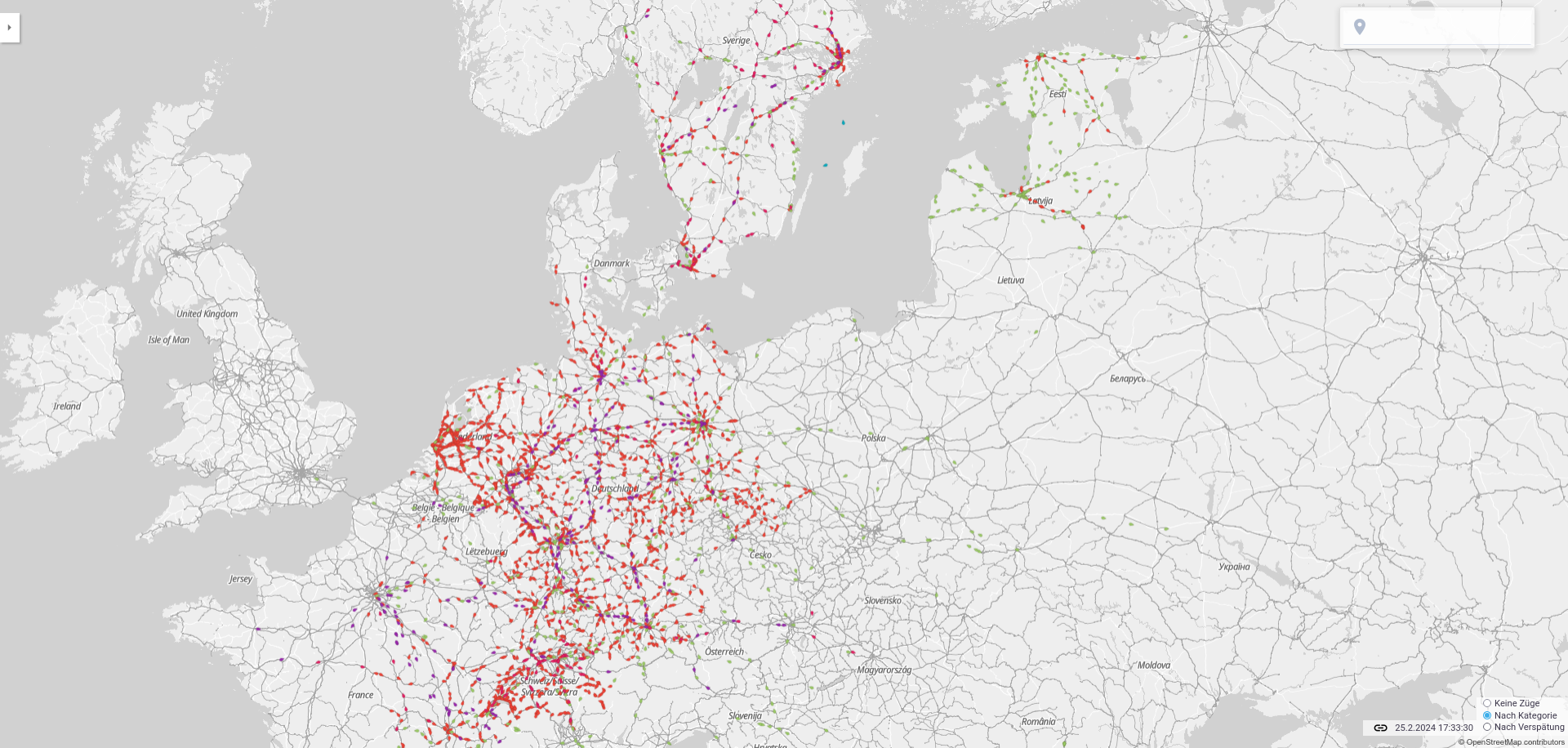
While of course our main motivation is to use it in KDE Itinerary, KDE’s travel planning app, it will be open for use in other apps.</p>

<p>We also have a little web interface running at <a href="https://transitous.org/">transitous.org</a>.</p>

<p>We are building this service based on great existing software, in particularly <a href="https://motis-project.de">MOTIS</a>.</p>

<p><a href="/img/transitous-web.png">
    <img src="/img/transitous-web.png" width="1000px" height="" class="" alt="Screenshot of the Transitous web interface, showing the positions of long-distance transit vehicles in Germany, the Netherlands, Switzerland, Latvia, Estonia and Sweden" />
</a></p>

<p>Now, to make this really useful, we need data on more regions.
Luckily, for most regions and countries that is fairly easy. Most transport agencies and countries make GTFS feeds available, that we can just use.</p>

<p>Adding an additional feed doesn’t take long and doesn’t need programming experience.
It’s pretty much just creating a small text file that explains how and where to download the data from.</p>

<p>Those links don’t necessarily stay the same forever, so we would be happy if lots of people take care of their region, and update the link every few years. It is really little work if split up, but can’t all be handled by a small team.</p>

<p>To make it even easier, we can already use the Transitland Atlas feed collection, for which you just need to choose the feed to use. The url will then automatically be looked up.</p>

<p>You can find out how to add a feed <a href="https://github.com/public-transport/transitous?tab=readme-ov-file#adding-a-region">here</a>.
Please let us know if the documentation is unclear anywhere.</p>

<p>If you are interested in using this service in your own application, it is probably a bit too early for production, but it makes sense to already implement support for the MOTIS API that we use.
You can find an early version of our API documentation <a href="https://routing.spline.de/doc/index.html">here</a>.</p>

<p>If there is anything else you are interested in helping with, for example improving our ansible playbook, creating a website, improving MOTIS or working on integrating OpenStreetMap routing, you can find our open tasks <a href="https://github.com/public-transport/transitous/issues">here</a>. We appreciate any help on those issues, and it of course speeds up the development of the project.</p>]]></content><author><name></name></author><category term="kde" /><summary type="html"><![CDATA[You may have already read about it on Volkers blog: we together with people from other public transport related projects are building a public transport routing service called Transitous. While of course our main motivation is to use it in KDE Itinerary, KDE’s travel planning app, it will be open for use in other apps.]]></summary></entry><entry><title type="html">New countries in KDE Itinerary</title><link href="https://jbb.ghsq.de/2024/01/14/New-Itinerary-backends.html" rel="alternate" type="text/html" title="New countries in KDE Itinerary" /><published>2024-01-14T01:12:00+01:00</published><updated>2024-01-14T01:12:00+01:00</updated><id>https://jbb.ghsq.de/2024/01/14/New-Itinerary-backends</id><content type="html" xml:base="https://jbb.ghsq.de/2024/01/14/New-Itinerary-backends.html"><![CDATA[<h3 id="lithuania-and-latvia">Lithuania and Latvia</h3>

<p>Caused by a small discussion about how it is difficult to get from Berlin to Riga by train,
and in direct consequence a quick look at how the official app for trains in Latvia finds its connections, I added support for it in KDE Itinerary.
KDE Itinerary is KDE’s travel planning app.</p>

<p>After I understood how it works, adding support for new data sources seemed pretty doable, so I directly moved on to do the same for trains in Lithuania as well.</p>

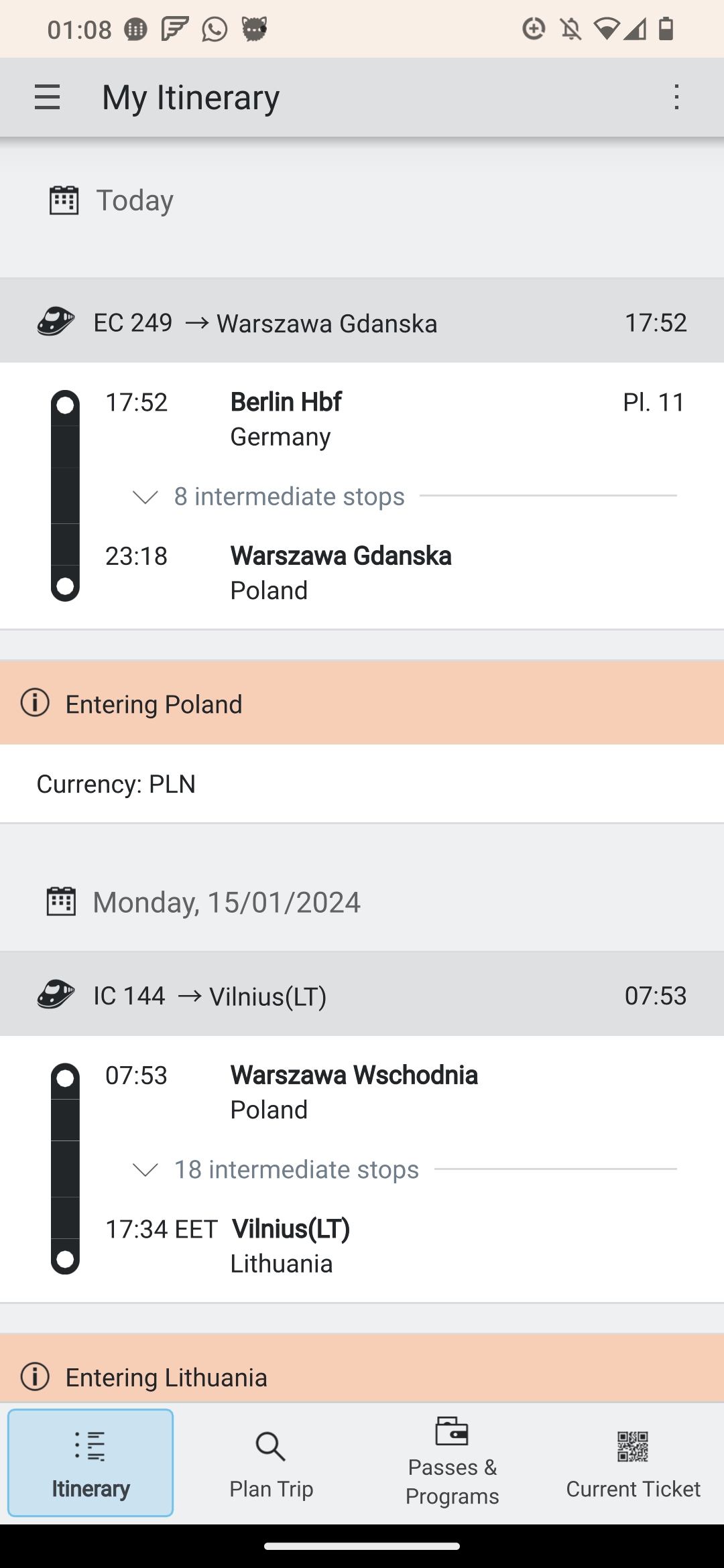
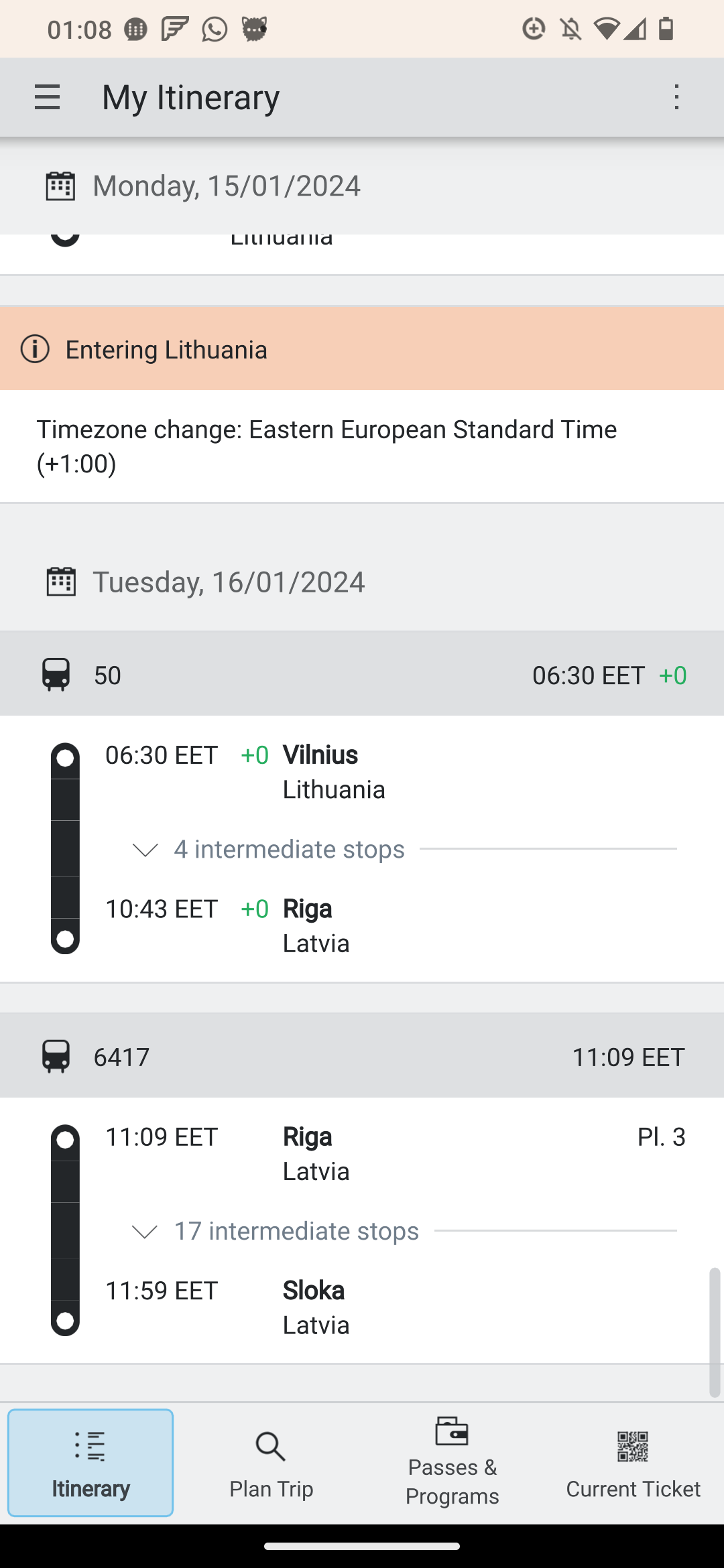
<p>As a result of this, it is now possible to travel from Berlin to Riga with Itinerary and continue further with the local trains there:</p>

<div class="post-img-right">
<a href="/img/itinerary/part1.png">
    <img src="/img/itinerary/part1.png" width="250px" height="" class="post-img" alt="Screenshot of the first part of the journey from Berlin Hauptbahnhof to Warszawa Gdanska using EC 249, and the next day continuing with IC 144 to Vilnius" />
</a>

<a href="/img/itinerary/part2.png">
    <img src="/img/itinerary/part2.png" width="250px" height="" class="post-img" alt="Screenshot of the second part, from Vilnius to Riga on the following day. Afterwards a local train to Sloka follows" />
</a>

</div>

<p>The connection is still far from good, but fear I can’t fix that in software.</p>

<p>What still does not work, is directly searching from Berlin to Riga, as that depends on having a single data source that has data on the entire route to find it.
So it is necessary to split the route and search for the parts yourself.</p>

<h3 id="why-you-cant-always-find-a-route-even-though-there-is-one">Why you can’t always find a route even though there is one</h3>

<p>The main data source for Itinerary in Europe is the API of the “Deutsche Bahn”, the main railway operator in Germany.
Its API also has data for neighbouring countries, and even beyond that.
<a href="https://jonworth.eu/how-to-actually-build-europe-wide-multimodal-public-transport-booking-platforms/">According to Jon Worth</a> their data comes from UIC Merits, which is a common system that railway operators can submit their routes to.
However that probably comes with high costs, so many smaller operators like the ones in Latvia and Lithuania don’t do that.
For that reason there is no such single data source that can route for example from Berlin to Riga.</p>

<p>What most of the operators in Europe do however, is publish schedule data in a common format (GTFS).
What is missing so far, is a single service that can route on all of the available data and has an API that we can use.
Setting something like this up would require a bit of community and hosting resources, but I am hopeful that we can have something like this in the future.</p>

<p>In the meantime, it already helps to fill in the missing countries one by one, so at least local users can already find their routes in Itinerary, and for Interrail and other cross border travel, people can at least patch routes together.</p>

<h3 id="more-countries">More countries</h3>
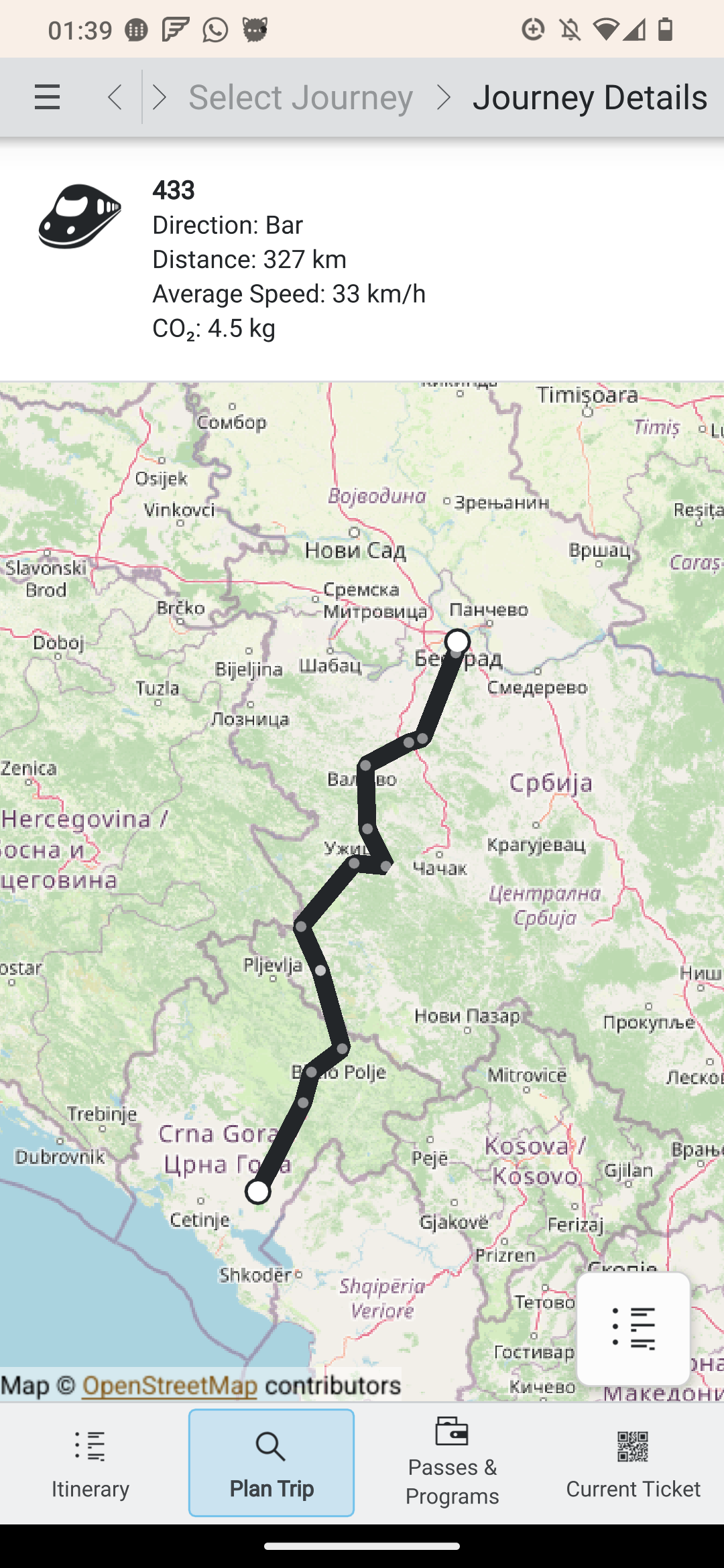
<p>The next country I worked on was Montenegro. The reason for that is that it is close to the area that the DB API can still give results for, and also still has useful train services.
Getting their API to work well was a bit more difficult though, as it doesn’t provide some of the information that Itinerary usually depends on.
For example coordinates for stations. Those are needed to select where to search for trains going from a station.
Luckily, exporting the list of stations and their coordinates from OpenStreetMap was relatively easy and provided me with all the data I needed.</p>

<p><a href="/img/itinerary/montenegro.png">
    <img src="/img/itinerary/montenegro.png" width="250px" height="" class="post-img post-img-right" alt="A route from Belgrade Center to Podgorica, shown on a map by KDE Itinerary" />
</a></p>

<p>Thanks to that Itinerary can now even show the route on a map properly.</p>

<p>Now only the API for Serbia is missing to actually connect to the part of the network DB knows about.</p>

<p>The new backends are not yet included in any release, but you can already find them in the nightly builds.
Be aware that the nightly builds have switched to Qt6 and KF6 faily recently, which means there are still a few rough edges and small bugs in the UI.</p>

<p>On Linux, you can use the nightly flatpak:</p>
<div class="language-plaintext highlighter-rouge"><div class="highlight"><pre class="highlight"><code>flatpak install https://cdn.kde.org/flatpak/itinerary-nightly/org.kde.itinerary.flatpakref
</code></pre></div></div>

<p>On Android, the usual <a href="https://community.kde.org/Android/F-Droid#KDE_F-Droid_Nightly_Build_Repository">KDE Nightly F-Droid repository</a> has up to date builds.</p>]]></content><author><name></name></author><summary type="html"><![CDATA[Lithuania and Latvia]]></summary></entry><entry><title type="html">Woodpecker CI with automatic runner creation</title><link href="https://jbb.ghsq.de/2023/05/14/self-hosted-ci-hetzner.html" rel="alternate" type="text/html" title="Woodpecker CI with automatic runner creation" /><published>2023-05-14T01:30:53+02:00</published><updated>2023-05-14T01:30:53+02:00</updated><id>https://jbb.ghsq.de/2023/05/14/self-hosted-ci-hetzner</id><content type="html" xml:base="https://jbb.ghsq.de/2023/05/14/self-hosted-ci-hetzner.html"><![CDATA[<p>I’ve been happily using Woodpecker CI to get CI for my repositories on Codeberg.
Codeberg is a non-profit community-driven git repository hosting platform, so they can’t provide free CI to everyone.</p>

<p>Since I run lots of stuff on small arm boards (for example this website), I need my CI jobs to create arm executables.
The easiest way to get that done is to just compile on arm devices, so I was happy to see that Hetzner is now offering arm nodes in their cloud offering.</p>

<p>To make that as cheap as possible, the CI should ideally create a VM before running its job, and remove it again afterwards.
Unfortunately Woodpecker does not seem to support that out of the box at this point.</p>

<p>My solution to that was to build a docker proxy, that creates VMs using docker-machine, and then proxies the incoming requests to the remote VM. That works really well now, so maybe you will find it useful.</p>

<p>Setting that up is reasonably simple:</p>
<ul>
  <li>Install docker-machine. I recommend using the <a href="https://gitlab-docker-machine-downloads.s3.amazonaws.com/main/index.html">fork by GitLab</a></li>
  <li>Install the backend for your cloud provider. For Hetzner I use <a href="https://github.com/JonasProgrammer/docker-machine-driver-hetzner">this one</a></li>
  <li><a href="https://codeberg.org/jbb/docker-proxy/releases/">Grab a binary release of docker-proxy</a> (if you need arm executables), or compile it yourself.</li>
  <li>Create a systemd unit to start the service on boot in <code class="language-plaintext highlighter-rouge">/etc/systemd/system/docker-proxy.service</code>.
This particular one just runs it on the <code class="language-plaintext highlighter-rouge">woodpecker-agent</code> user that you may already have if you use Woodpecker CI.</li>
</ul>

<div class="language-toml highlighter-rouge"><div class="highlight"><pre class="highlight"><code><span class="nn">[Unit]</span>
<span class="py">Description</span><span class="p">=</span><span class="err">Docker</span> <span class="err">CI</span> <span class="err">proxy</span>
<span class="py">After</span><span class="p">=</span><span class="err">network.target</span>

<span class="nn">[Service]</span>
<span class="py">User</span><span class="p">=</span><span class="err">woodpecker-agent</span>
<span class="py">Group</span><span class="p">=</span><span class="err">nogroup</span>
<span class="py">Restart</span><span class="p">=</span><span class="err">always</span>
<span class="py">ExecStart</span><span class="p">=</span><span class="err">/usr/local/bin/docker-proxy</span>

<span class="nn">[Install]</span>
<span class="py">WantedBy</span><span class="p">=</span><span class="err">multi-user.target</span>
</code></pre></div></div>

<ul>
  <li>Fill in <code class="language-plaintext highlighter-rouge">/etc/docker-proxy/config.toml</code>
This example works for Hetzner, but everything that has a docker-machine provider should work. You just need to supply the arguments for the correct backend.</li>
</ul>

<div class="language-toml highlighter-rouge"><div class="highlight"><pre class="highlight"><code><span class="nn">[docker_machine]</span>
<span class="py">driver</span><span class="p">=</span><span class="s">"hetzner"</span>
<span class="py">args</span><span class="p">=[</span>
    <span class="py">"--hetzner-api-token</span><span class="p">=</span><span class="err">&lt;token&gt;</span><span class="s">",</span><span class="err">
</span>    <span class="py">"--hetzner-server-type</span><span class="p">=</span><span class="err">cax</span><span class="mi">11</span><span class="s">",</span><span class="err">
</span>    <span class="py">"--hetzner-image-id</span><span class="p">=</span><span class="mi">103907373</span><span class="s">",</span><span class="err">
</span><span class="p">]</span>

<span class="nn">[general]</span>
<span class="py">timeout</span><span class="p">=</span><span class="mi">300</span>
<span class="py">port</span><span class="p">=</span><span class="mi">8000</span>
</code></pre></div></div>
<ul>
  <li>Finally, make <code class="language-plaintext highlighter-rouge">woodpecker-agent</code> use the new docker proxy, by setting <code class="language-plaintext highlighter-rouge">DOCKER_HOST=http://localhost:8000</code> in its environment.</li>
</ul>

<p>I hope this may be useful for you as well :)</p>]]></content><author><name></name></author><summary type="html"><![CDATA[I’ve been happily using Woodpecker CI to get CI for my repositories on Codeberg. Codeberg is a non-profit community-driven git repository hosting platform, so they can’t provide free CI to everyone.]]></summary></entry><entry><title type="html">FutureSQL 0.1.0 released</title><link href="https://jbb.ghsq.de/2023/04/20/futuresql-0.1.0-released.html" rel="alternate" type="text/html" title="FutureSQL 0.1.0 released" /><published>2023-04-20T14:09:00+02:00</published><updated>2023-04-20T14:09:00+02:00</updated><id>https://jbb.ghsq.de/2023/04/20/futuresql-0.1.0-released</id><content type="html" xml:base="https://jbb.ghsq.de/2023/04/20/futuresql-0.1.0-released.html"><![CDATA[<p>I’m happy to announce the first release of FutureSQL,
a library for accessing SQLite (and other databases) in Qt projects without blocking.</p>

<p>It also features a migration system and automatic result deserialization.</p>

<p>For examples, please have a look at the <a href="https://invent.kde.org/libraries/futuresql">README</a>.</p>

<p>You can fetch the release from <a href="https://download.kde.org/stable/futuresql/">KDE’s download server</a>.
It is signed with my PGP key <code class="language-plaintext highlighter-rouge">C3D7CAFBF442353F95F69F4AA81E075ABEC80A7E</code>, which you can fetch from <a href="https://keys.openpgp.org/search?q=C3D7CAFBF442353F95F69F4AA81E075ABEC80A7E">keys.openpgp.org</a>.</p>

<p>Please let me know if you find any issues.</p>]]></content><author><name></name></author><summary type="html"><![CDATA[I’m happy to announce the first release of FutureSQL, a library for accessing SQLite (and other databases) in Qt projects without blocking.]]></summary></entry><entry><title type="html">Recent AudioTube improvements</title><link href="https://jbb.ghsq.de/2022/11/25/audiotube-improvements.html" rel="alternate" type="text/html" title="Recent AudioTube improvements" /><published>2022-11-25T00:48:00+01:00</published><updated>2022-11-25T00:48:00+01:00</updated><id>https://jbb.ghsq.de/2022/11/25/audiotube-improvements</id><content type="html" xml:base="https://jbb.ghsq.de/2022/11/25/audiotube-improvements.html"><![CDATA[<p>Since the last post about AudioTube, a lot has happened!
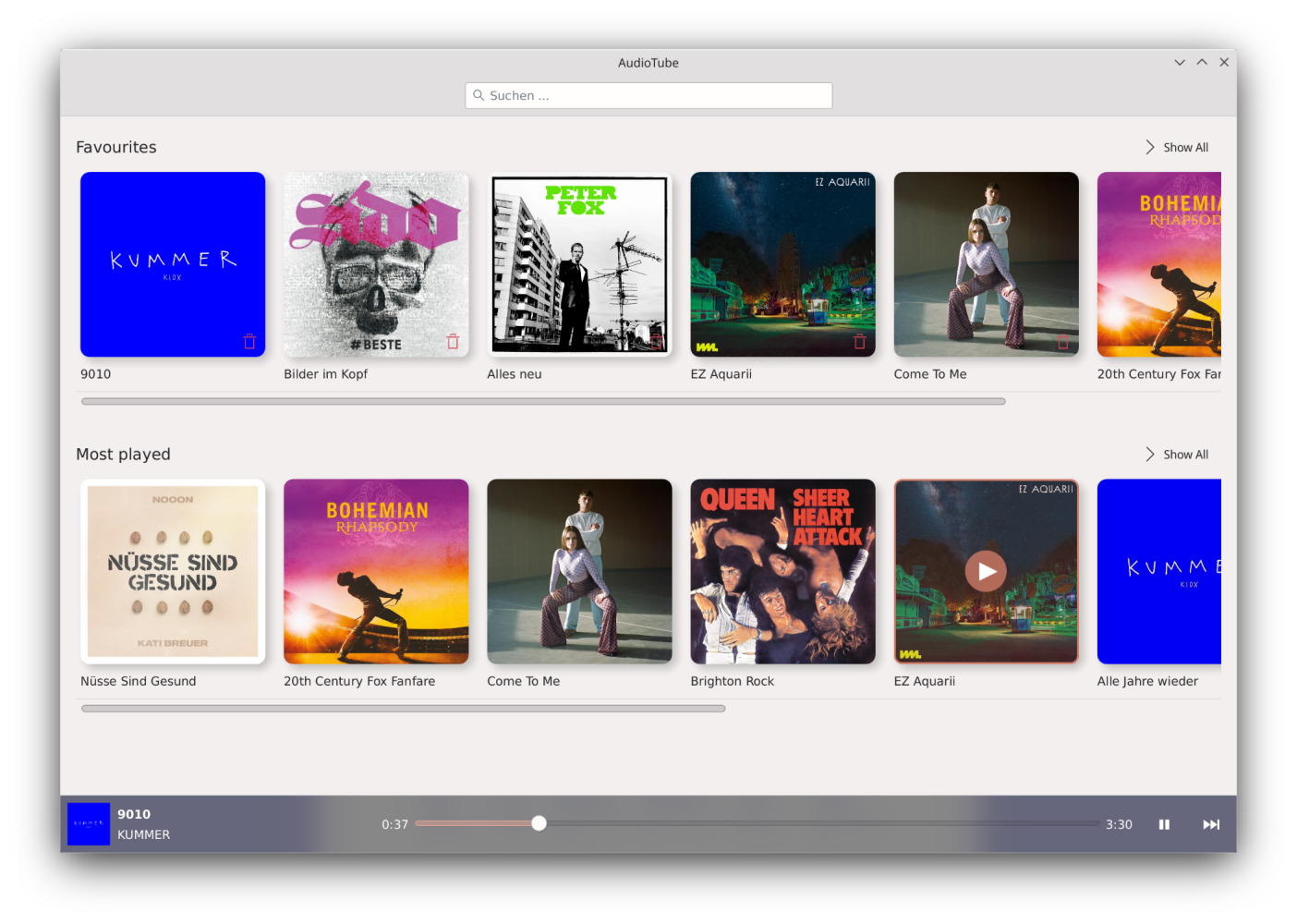
So in this blog post, you can find a summary of the important changes.</p>

<h2 id="notable-new-features">Notable new features</h2>

<h3 id="library">Library</h3>

<p>AudioTube now has a library, in which you can see your favourite, most often and recently played songs.
<img src="/img/audiotube/library.png" alt="library with rounded covers" width="500px" /></p>
<h3 id="filtering-through-previous-searches">Filtering through previous searches</h3>

<p>This allows searching through locally known songs and previous search terms, without even sending a request to youtube.
<img src="/img/audiotube/search.png" alt="search dialogue which displays songs from your history" width="500px" /></p>
<h3 id="lyrics">Lyrics</h3>

<p>While playing a song, you can now see the lyrics of the song in a separate tab.
<img src="/img/audiotube/lyrics.png" alt="lyrics shown in the player" width="500px" /></p>
<h2 id="user-interface-improvements">User Interface improvements</h2>

<p>Finally, AudioTube displays album covers everywhere. Devin Lin has redesigned and improved the actual audio player.
Mathis Brüchert has done several design improvements across the board, like rounded album covers, improved spacing.</p>

<p>The support for wider screens has also been improved, and the queue list will now only expand up too 900 virtual pixels.
<img src="/img/audiotube/player.png" alt="player" width="500px" /></p>
<h2 id="fixes">Fixes</h2>

<p>Fetching thumbnails is now much faster, since in most cases the thumbnail ID can be reliably predicted, without querying yt-dlp.
In the few remaining cases, querying yt-dlp is still the fallback</p>

<h2 id="install">Install</h2>

<p>If you want to try AudioTube, you can get the latest stable version from <a href="https://flathub.org/apps/details/org.kde.audiotube">flathub</a>.
If you want the latest improvements, which are usually already reasonably stable, you can grab a nightly build from the <a href="https://community.kde.org/Guidelines_and_HOWTOs/Flatpak">KDE Nightly flatpak</a> repository.</p>

<h2 id="code-improvements">Code improvements</h2>

<p>While developing the library feature, a small new library was developed. I called it FutureSQL, after the QFuture type it uses for most parts of its API.
FutureSQL provides an asynchronous API for QtSql, by running the database queries on a separate thread. It also provides convinient template functions for passing parameters to SQL queries.</p>

<p>Possibly the most interesting feature is automatically deserialize the resulting data from an SQL query into a struct.
This works thanks to C++ templates.</p>

<p>In the simplest cases, nothing but</p>
<pre><code class="language-C++">struct Song {
	using ColumnTypes = std::tuple&lt;QString, QString, QString, QString&gt;;

	QString videoId;
	QString title;
	QString album;
	QString artist
}
</code></pre>
<p>is required.</p>

<p>The library version of this code does not yet have a stable release, however you can already try the API if you build the library <a href="https://invent.kde.org/jbbgameich/futuresql/">from the repository</a>.</p>]]></content><author><name></name></author><summary type="html"><![CDATA[Since the last post about AudioTube, a lot has happened! So in this blog post, you can find a summary of the important changes.]]></summary></entry><entry><title type="html">Connecting an electric typewriter to a modern computer</title><link href="https://jbb.ghsq.de/2022/03/12/electric-typewriter.html" rel="alternate" type="text/html" title="Connecting an electric typewriter to a modern computer" /><published>2022-03-12T02:52:00+01:00</published><updated>2022-03-12T02:52:00+01:00</updated><id>https://jbb.ghsq.de/2022/03/12/electric-typewriter</id><content type="html" xml:base="https://jbb.ghsq.de/2022/03/12/electric-typewriter.html"><![CDATA[<p>My blog post writing delay is huge right now, sorry for that, but here it finally is: the writeup of the typewriter technology I experimented with in January.</p>

<p>This is about a SIGMA SM 8200i typewriter, which my parents gave to me for entertainment purposes when I was a child.
Now that I’m older, the entertainment has shifted more towards the technical internals.</p>

<p>When we talked about teletype technology at my local university hackerspace, Spline, I remembered the typewriter had a 26-pin connector.
After some research, I learned that the machine is basically an Erika S3004, one of the most popular typewriters of the GDR, in a different case.
With this new knowledge, I was able to find a <a href="https://hc-ddr.hucki.net/wiki/doku.php/z9001:erweiterungen:s3004">table of commands</a> which can be sent and received from the device.</p>

<p>The 26-pin connector is a port used in the GDR, which speaks a faily standard rs232 protocol, with a baud-rate of 1200.
In fact, the USB TTL adapter I usually use for routers, worked on it after some creative wiring.</p>

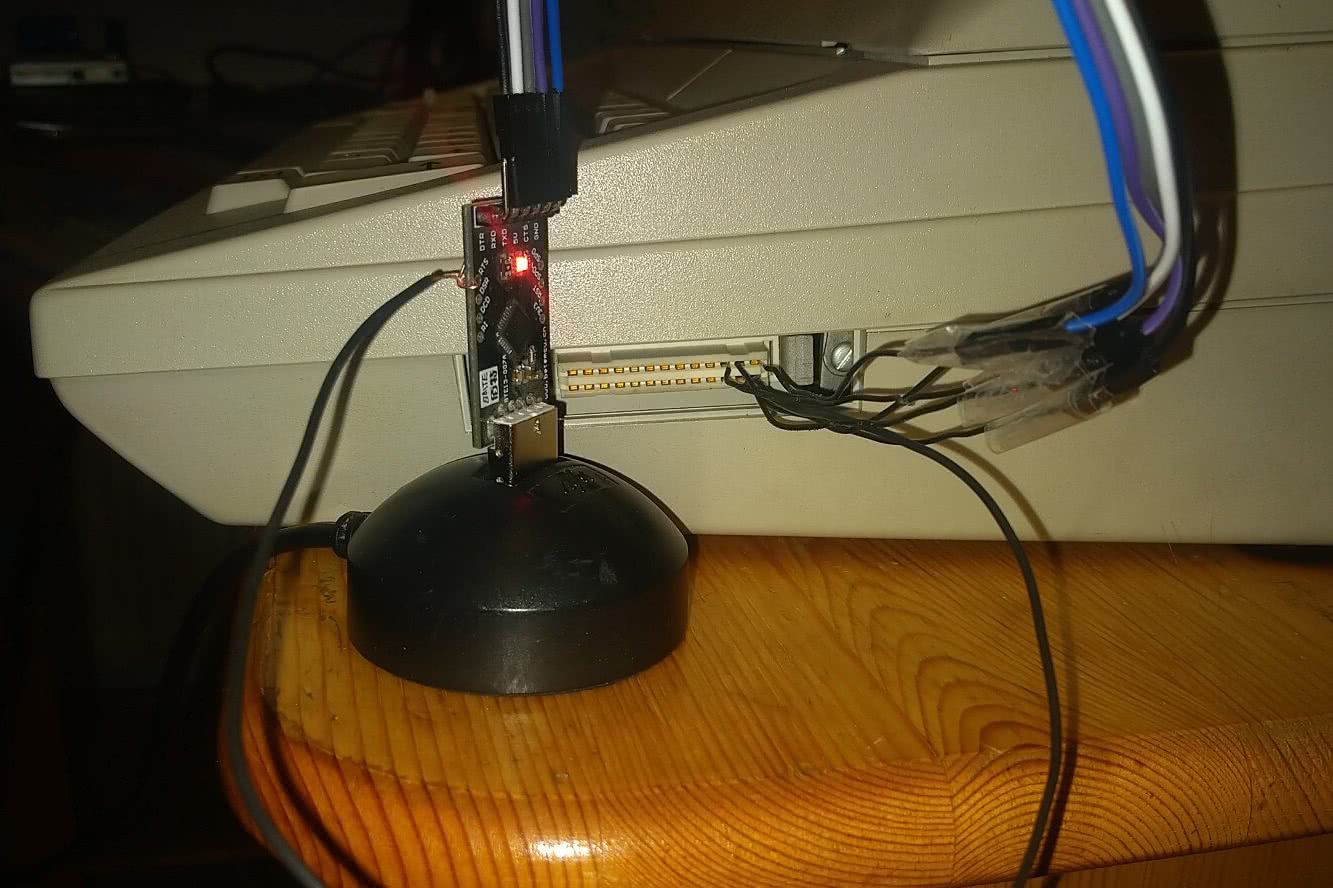
<figure>
    <a href="/img/typewriter_interface_1_0.jpeg">
    <img src="/img/typewriter_interface_1_0.jpeg" width="400" height="" class="" alt="Version 1.0 of the typewriter interface" />
</a>

    <figcaption>The initial attempt at connecting, with lots of tape and no proper connector</figcaption>
</figure>

<p>The commands that can be sent and received over the serial interface can be separated into two groups: control codes and character codes.
Unfortunately the typewriter does not support unicode … or ASCII.
So the first step was encoding and decoding the “gdrascii” codec, like the Chaostreff Potsdam people like to call it.
Luckily, I could just do a pretty-much 1:1 translation of the <a href="https://github.com/Chaostreff-Potsdam/erika3004">python code from Chaostreff Potsdam</a> into rust.</p>

<p>For those interested in rust: The new gdrascii_codec crate exposes mostly const API, which allows to write strings in unicode in the source code for readability,
but already translating them into gdrascii at compile time.</p>

<p>After also implementing the control codes from the table, plus some glue code for opening the serial connection with the correct parameters, I could do the first prints.</p>

<figure>
    <video width="400" controls="">
        <source src="/vid/typewriter-printing.mp4" type="video/mp4" />
    </video>
    <figcaption>Printing Tux</figcaption>
</figure>

<p>The second feature I wanted to support was keyboard input, since the typewriter supports a mode in which it sends keyboard input over the serial connection instead of printing it.
This was quite easily possible using the linux kernel uinput API. The only complication was, that the typewriter already sends ready made character codes, but the linux kernel expects to receive raw keypresses.</p>

<p>For the character “L”, the Linux kernel expects “(Left Shift or Right Shift) + L”, so this could just be translated back.</p>

<figure>
    <video width="400" controls="">
        <source src="/vid/typewriter-typing.mp4" type="video/mp4" />
    </video>
    <figcaption>Tooting from the typewriter</figcaption>
</figure>

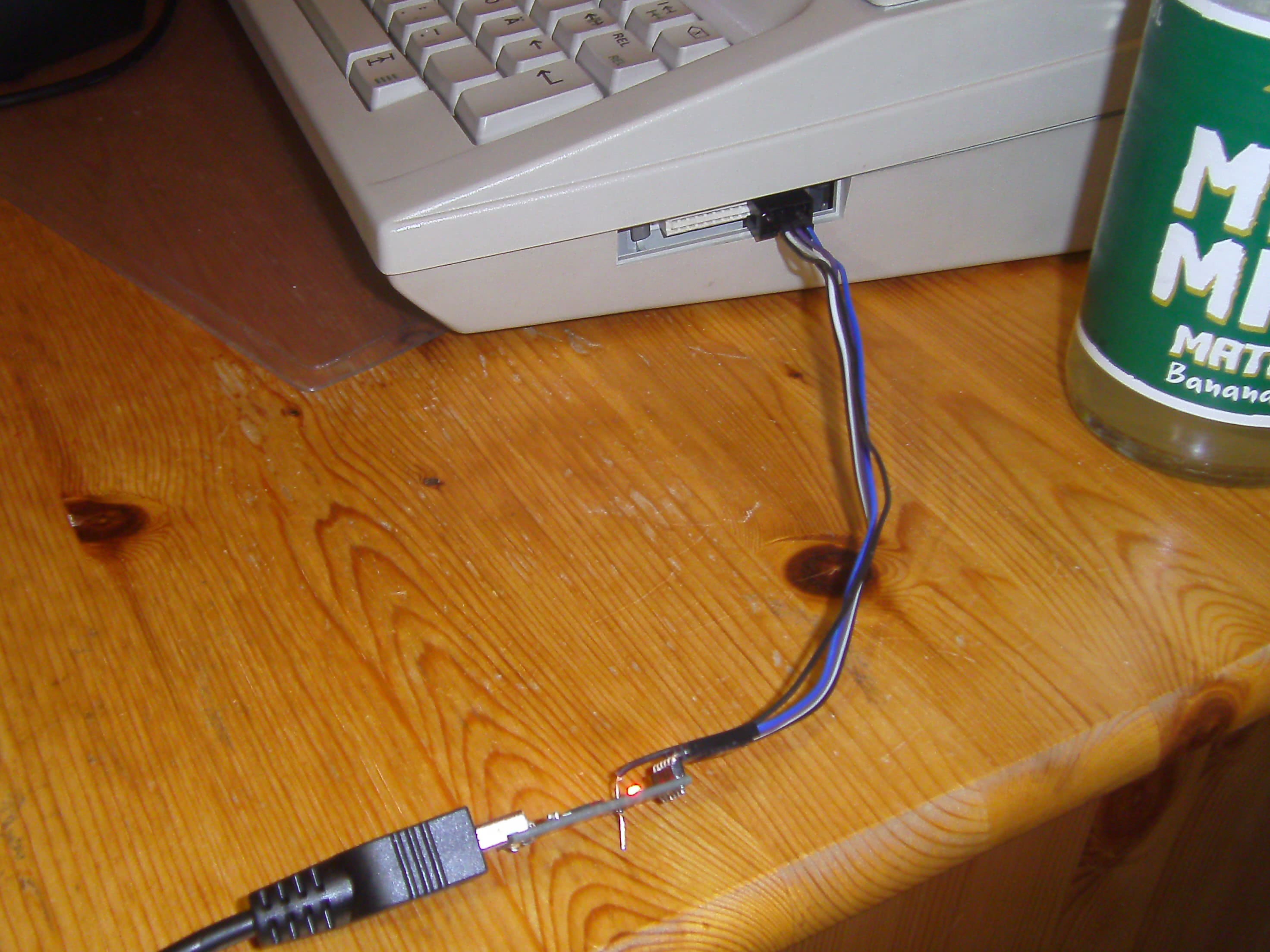
<p>Once that was all done, I ordered a proper connector so that I could easily put everything back together after putting it in the drawer.</p>

<figure>
    <a href="/img/typewriter_interface_2_0.JPG">
    <img src="/img/typewriter_interface_2_0.JPG" width="400" height="" class="" alt="Version 2.0 of the typewriter interface" />
</a>

    <figcaption>The final result, with a proper connector</figcaption>
</figure>

<p>As always, the source code is open source. This time I published it on <a href="https://codeberg.org/jbb/erika_S3004">Codeberg</a>, together with some documentation on how to wire the device to a serial adapter.</p>

<p>And for those wondering what this project was useful for: probably nothing 😁. It’s just cool that technology from such different times still works together so well.</p>]]></content><author><name></name></author><summary type="html"><![CDATA[My blog post writing delay is huge right now, sorry for that, but here it finally is: the writeup of the typewriter technology I experimented with in January.]]></summary></entry></feed>